Getting Usable Files Out of a Client, Not Just Files
Half the assets a website needs are files, not words: a logo, brand colors, photos, a menu PDF, a favicon. Getting the right version of each is where most of the back-and-forth happens.
Problem
A client's "logo" is usually a JPEG screenshot of a business card, or a PNG exported at 150 pixels wide because that's what fit in an old email signature. The vector file, if it ever existed, is on a designer's laptop from three years ago. You ask again, get the same file back, and have to explain — again — what "vector" means.
Photos arrive the same way: forwarded through WhatsApp, which recompresses everything, so a photo that looked fine on the client's phone is unusable once it fills a homepage banner. PDFs like the menu or price list show up as phone photos of printed paper, at an angle, with a thumb in the corner.
None of this is the client being careless. They don't know what "512px minimum" or "vector format" means, and they have no way to check before hitting send. By the time you notice, you've already spent the goodwill of one "can you resend that" — and sometimes it takes three.
Workflow
- Define each asset as a typed item with real constraints. A logo is an
imageitem requiring SVG or PNG at a minimum width; brand colors are acolor_list; the menu and price list go in as afile_listrestricted to PDF and a size cap. - The client uploads through the portal, not a chat app. No WhatsApp compression, no attachment size limit — the file goes straight from their phone or computer to the format check.
- Bad files are caught before they're accepted. A photo that's too small or the wrong format is rejected on the spot, with the reason spelled out in plain language.
- You review what did get through. For anything that technically passes but isn't right — a busy background, a blurry photo — a revision request with a specific note flags it in the client's portal, no extra email needed.
- You or your agent pull signed URLs, not attachments. Each accepted file comes back with a temporary link, its dimensions, size, and checksum — ready to fetch into the build directly.
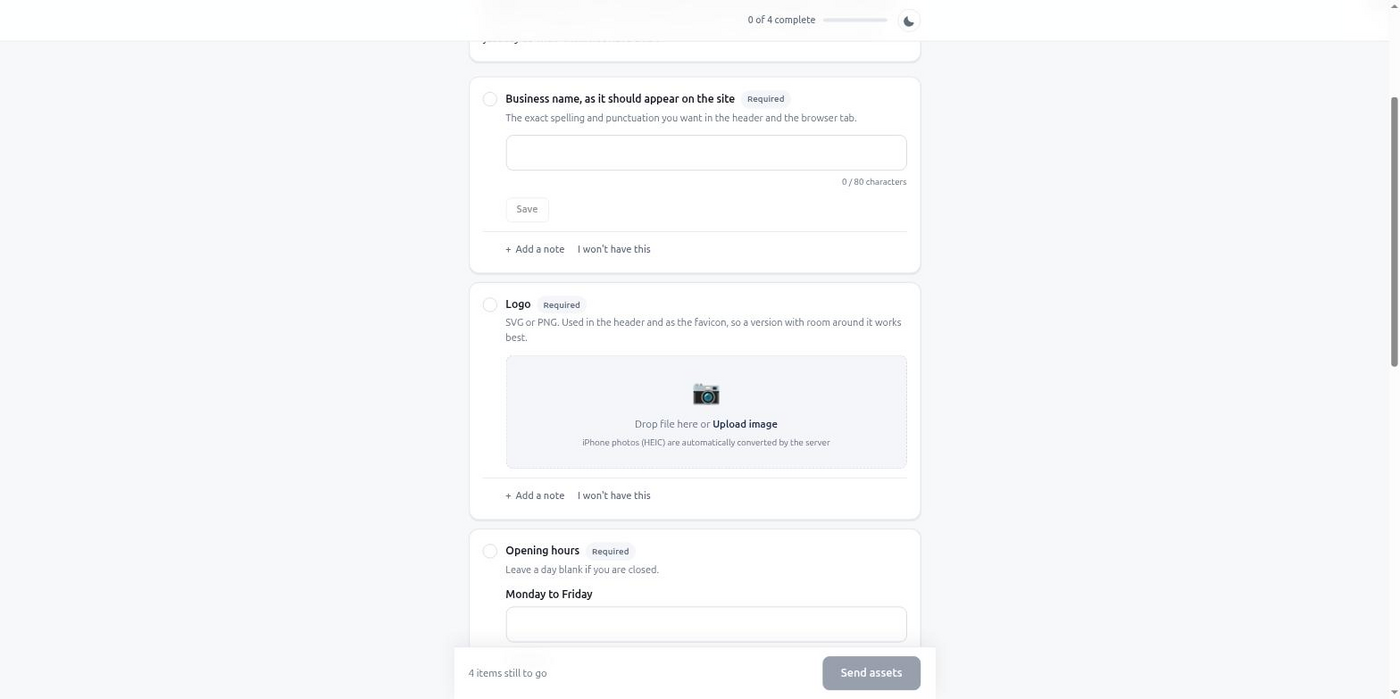
MCP example
The agent defines exactly what it needs, with the checks baked into the item itself — no separate "please make sure it's..." instructions for the client to remember:
{
  "project_name": "Bella Cucina — Brand Assets",
  "client": {
    "name": "Marco Esposito",
    "email": "marco@bellacucina.cz"
  },
  "items": [
    {
      "key": "logo",
      "type": "image",
      "label": "Restaurant logo",
      "help": "SVG preferred, or PNG with a transparent background, at least 512px on the shortest side.",
      "required": true,
      "constraints": {
        "formats": ["svg", "png"],
        "min_width": 512,
        "transparent_background": true
      }
    },
    {
      "key": "favicon_source",
      "type": "image",
      "label": "Favicon source image",
      "help": "A square version of the logo, at least 512x512px, used to generate the site icon.",
      "required": true,
      "constraints": {
        "formats": ["png"],
        "min_width": 512,
        "min_height": 512
      }
    },
    {
      "key": "brand_colors",
      "type": "color_list",
      "label": "Brand colors",
      "required": true
    },
    {
      "key": "photos",
      "type": "file_list",
      "label": "Food and interior photos",
      "help": "5 to 15 photos, straight from your phone camera is fine.",
      "required": true,
      "constraints": {
        "formats": ["jpg", "png", "heic"],
        "min_count": 5,
        "max_count": 15
      }
    },
    {
      "key": "menu_and_price_list",
      "type": "file_list",
      "label": "Menu and price list (PDF)",
      "required": true,
      "constraints": {
        "formats": ["pdf"],
        "max_bytes": 10485760,
        "max_count": 3
      }
    }
  ],
  "chase_schedule": "default"
}
get_intake_results hands each accepted file back as a signed URL good for 24 hours, with its filename, MIME type, dimensions, and a checksum — enough to fetch and place directly. HEIC photos from an iPhone are already converted to JPEG by the time they reach you.
Result
You stop receiving files you can't use and then having to explain why. Every upload already met the format and size you asked for, because the portal checked it and the client saw the reason if it didn't. What comes back is ready to place in the build: the logo is a vector or a properly sized PNG, the photos meet the width you need, the PDFs open cleanly. The round of back-and-forth that used to be routine mostly disappears.
Start free, no card required, and send your next asset request as constraints the portal enforces instead of instructions the client has to remember.
Free tier, no card required.
Reference and comparisons for this workflow.