Your agent finished the build. Now it's waiting on a human.
Claude Code, Cursor, or Codex can scaffold a working product in hours. The bottleneck isn't the agent anymore — it's the client's inbox.
Problem
You run an AI agency: clients come to you to have something built with a coding agent, fast. The agent genuinely delivers fast. Then it hits the part no model can shortcut — it needs the client's logo, a Stripe key, a support email address, maybe an existing admin login to migrate from — and there is no clean way for an autonomous agent to ask a non-technical person for that and get a structured, usable answer back.
The usual workarounds are worse than the wait:
- The agent stops and you relay the request by hand — copy the list, paste it into an email, wait, then copy the reply back into the session yourself. The agent didn't get faster; you became the interface.
- The client replies with a WhatsApp photo of a login screen, or pastes a Stripe key into the middle of an email you now have to extract and never want logged anywhere.
- Nobody chases the client, so the intake email sent day one is still the only thing that ever went out, and the project quietly stalls.
The agent can build the entire thing before the client has answered a single question — and then it just sits there, session idle, waiting on a reply that may take a week.
Workflow
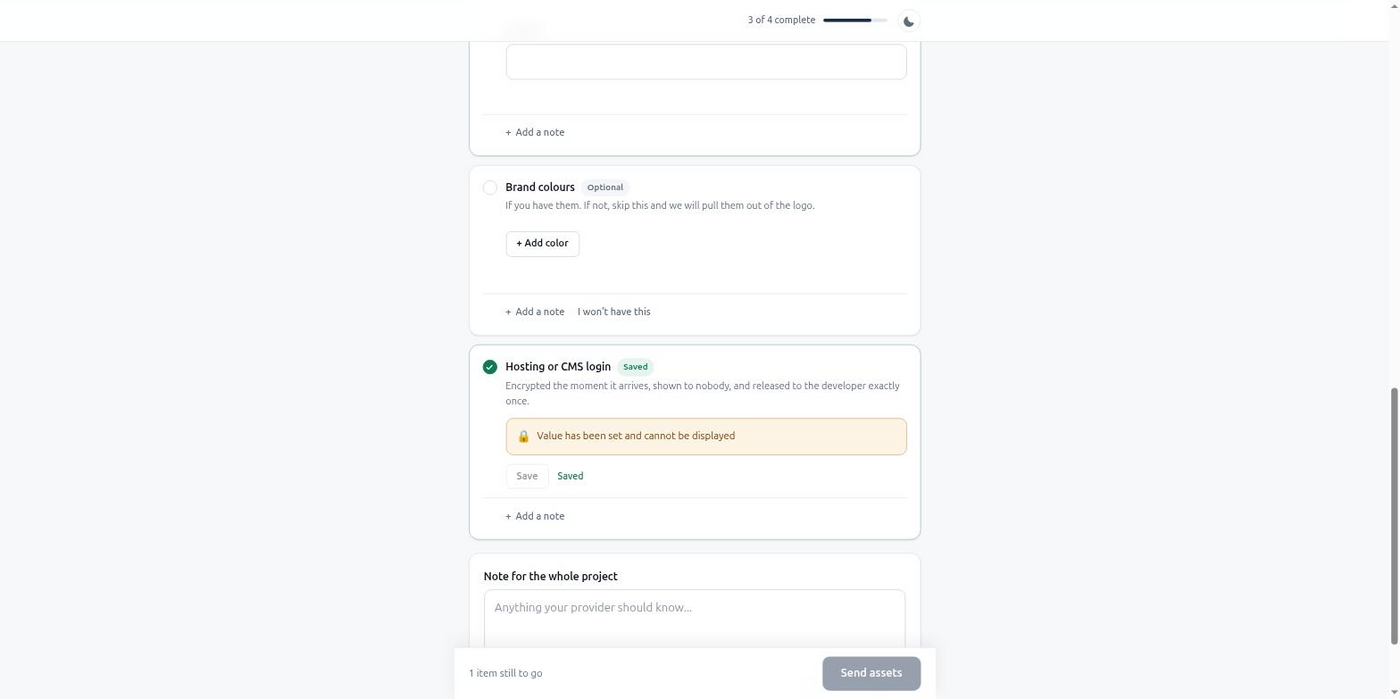
- The agent decides what it needs, mid-build. As it scaffolds the project, it works out the exact list — logo, brand colors, a Stripe key, a support address — and calls
define_intakeitself, no PM in the loop. - The client gets a portal link by email, addressed and branded to your agency, with no account to create and no technical setup on their end.
- The agent keeps building whatever doesn't depend on the client's answers, instead of blocking the whole session on a reply.
- BriefGate chases on a schedule the agent picked —
aggressivefor a same-week deadline — and the agent never has to remember to follow up. - A registered webhook wakes the agent up.
intake.completed(oritem.submittedfor an item-by-item resume) fires the moment the client is done, instead of the agent polling in a loop. - The agent calls
get_intake_resultsand resumes exactly where it paused, with typed data ready to use.
MCP example
Mid-build, the agent realizes it needs brand assets and a live payment key before it can finish integration, and creates the intake itself:
{
  "project_name": "Fintra Onboarding Bot — Assets Needed",
  "client": {
    "name": "Marek Dvorak",
    "email": "marek@fintra.io"
  },
  "items": [
    { "key": "logo", "label": "Company logo", "type": "image", "required": true,
      "constraints": { "formats": ["svg", "png"], "min_width": 512 } },
    { "key": "brand_colors", "label": "Brand colors", "type": "color_list", "required": true },
    { "key": "stripe_key", "label": "Stripe secret key (live or test)", "type": "secret", "required": true },
    { "key": "support_email", "label": "Support inbox address", "type": "text", "required": true }
  ],
  "chase_schedule": "aggressive"
}
The agent also registers a webhook once, with manage_webhook, so it hears about completion instead of checking in a loop. When the client finishes, get_intake_results hands back the logo as a signed URL, the brand colors and support address as plain values, and the Stripe key decrypted on that first call only — the agent stores it immediately, since a second call returns null with a note that it was already revealed.
Custom chase schedules such as aggressive need the Solo plan or higher; on Free the default schedule applies and everything else in this example works as shown.
Result
The agent stops being a relay for copy-pasted requests and becomes the thing that asks, waits, and resumes on its own. Nothing sits in a chat log waiting for you to notice it and forward it along. The client answers once, in a portal built for someone who isn't technical, and the session picks up automatically the moment they're done — no polling, no manual follow-up, no key typed into a message thread.
Connect BriefGate over MCP and let the next build ask for what it needs itself — free to start, no card required.
Free tier, no card required.
Reference and comparisons for this workflow.